Relevance AI Review 2026: Multi-Agent Platform for Building AI Teams Without Code
Hands-on Relevance AI review covering the no-code agent builder, Workforce multi-agent canvas, built-in vector database, pricing from free to $349/mo, and honest pros and cons for teams in 2026.
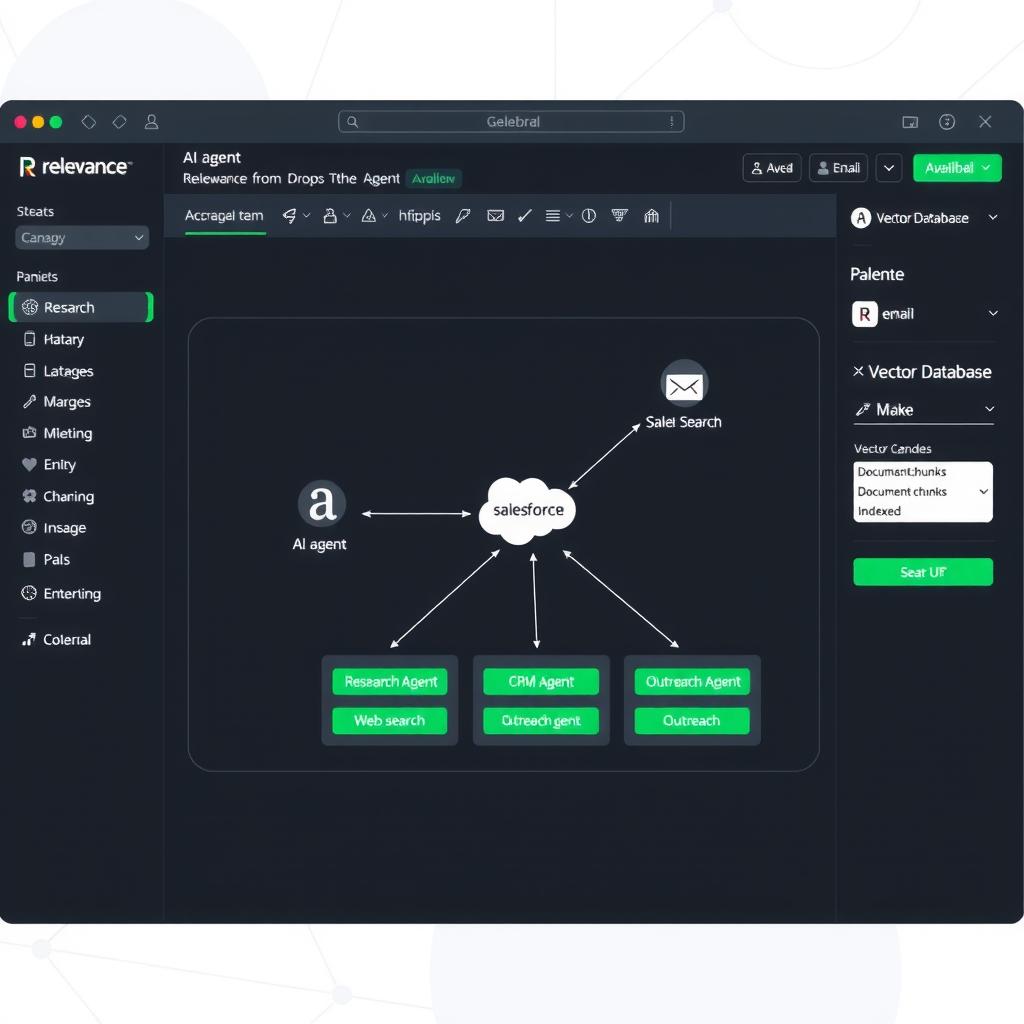
Relevance AI is a no-code platform for building AI agents — and crucially, teams of AI agents that collaborate. Instead of building one agent that does everything, you build specialized agents (one for research, one for CRM updates, one for email) and wire them together on a visual canvas called the Workforce builder.
This review covers what Relevance AI actually does, how the pricing breaks down in 2026, where it’s genuinely useful, and who should (and shouldn’t) use it.
TL;DR
Relevance AI is the strongest no-code option for multi-agent systems — building teams of specialized AI agents that hand off tasks and share data. The Workforce canvas lets you design agent workflows visually, and the built-in vector database means you can do RAG (retrieval-augmented generation) without setting up Pinecone or Weaviate. Start for free at 200 actions/month, Pro at $19/month (annual) for 2,500 actions [1].
The tradeoffs: there’s a massive price gap between Pro ($19/mo) and Team ($349/mo), no native scheduling triggers (you need cron or GitHub Actions), and debugging agent failures is harder than it should be. Best for operations teams and agencies building AI agent systems for clients. Skip it if you only need simple email/calendar automation — Lindy or Bardeen are cheaper and faster to set up.
Rating: 7.5/10 — Best multi-agent builder for non-developers, but pricing and debugging gaps hold it back.
What Is Relevance AI?
Relevance AI is a platform for building, running, and managing AI agents — no coding required. Founded in Australia, the company positions itself as “the home of the AI workforce,” where you can build teams of AI agents that work together on complex business processes [2].
What sets Relevance apart from other no-code agent builders like Lindy or MindStudio:
- Multi-agent orchestration — You don’t build one agent. You build many specialized agents and connect them into a workforce
- Built-in vector database — Store and search your company data for RAG workflows without third-party infra
- Agent marketplace — Clone and customize pre-built agents built by the community
- Embedded AI — Deploy agents as chat widgets on your website or embed them into your app
The platform has two main modes:
- Invent — Build agents by describing what they do in natural language
- Workforce — Connect multiple agents on a visual drag-and-drop canvas
Who it’s for: Operations managers, agencies, and mid-size teams building multi-step agent workflows. If your process needs three or more specialized agents working in sequence (research → qualify → update CRM → notify Slack), Relevance’s multi-agent approach is cleaner than cramming everything into one agent.
Key Features
Agent Invent — Natural Language Agent Builder
Invent is Relevance’s quick-start mode. You describe what you want the agent to do in plain English — “Research companies in our ICP, find decision-makers, and write personalized outreach emails” — and Relevance generates an agent with the tools, instructions, and knowledge base it needs.
In practice, Invent works well for straightforward agents with clear scope. Complex requests with many conditional paths benefit from the more explicit Workforce builder instead. You can always start in Invent and then refine in Workforce — the agents transfer between modes.
Workforce Canvas — Multi-Agent Orchestration
The Workforce canvas is Relevance’s standout feature. It’s a visual drag-and-drop builder where you connect agents into workflows. Each agent has defined inputs, outputs, and tools. Agents can:
- Pass data to each other (structured and unstructured)
- Run in parallel on different parts of a task
- Trigger based on upstream agent completion
- Share a common knowledge base or each have their own
This is genuinely different from single-agent platforms. If your process has distinct stages that need different expertise — one agent researches, another qualifies, a third writes output, a fourth updates your CRM — the Workforce approach lets you build, test, and iterate each agent independently.
Built-in Vector Database
Relevance includes a managed vector database for semantic search, embeddings, and RAG. You upload documents (PDFs, Notion exports, knowledge base articles) and agents can query them during tasks [3]. This means:
- No separate Pinecone / Weaviate / Chroma setup
- Docs get chunked and embedded automatically
- Agents access relevant context during execution
The vector DB is a genuine time-saver for teams building knowledge retrieval agents, but it’s not as flexible as dedicated vector databases — you can’t control chunking strategy or embedding model choices as granularly.
Tools & Actions System
Tools are the building blocks that agents use to take action. Relevance ships with:
- Pre-built tools — Search the web, scrape URLs, query databases, send emails, read/write Google Sheets
- API action tools — Connect to 2,000+ integrations including Gmail, Slack, HubSpot, Salesforce, Notion, and Apollo [4]
- Custom API tools — Build your own by specifying endpoint, method, and parameters
- Code tools — Python/JS snippets for transformations
The tool system is modular: you build tools once and assign them to any agent. This gets powerful in the Workforce — a research agent might use “Web Search” and “Scrape URL” tools, while a CRM agent uses “HubSpot: Update Contact” and “Slack: Send Message.”
Agent Marketplace
Relevance’s marketplace has hundreds of pre-built agents covering common use cases: sales development, customer support, content research, data enrichment, and more. You can clone any agent, inspect its tools and prompts, and customize it [5]. Notable marketplace agents include a multi-platform GTM workforce (G-Suite, HubSpot, Salesforce) with 1,700+ clones.
Embedded AI
You can embed Relevance agents as chat widgets on your website using an iframe or script tag. This turns your board of directors deck or product documentation into an interactive Q&A chatbot without building a custom frontend. The embedded agent uses your vector database as its knowledge source.
Pricing
Relevance AI uses a two-part billing system: Actions (what your agents do) and Vendor Credits (AI model costs like GPT-5, Claude Opus). You’re billed for both.
| Plan | Monthly Price | Annual Price | Actions/Month | Vendor Credits | Users |
|---|---|---|---|---|---|
| Free | $0 | $0 | 200 | 1,000 (one-time) | 1 |
| Pro | ~$22/mo | $19/mo ($228/yr) | 2,500 | $20/mo | 2 |
| Team | $349/mo | $234/mo ($2,808/yr) | 7,000 | $70/mo | 5 |
| Enterprise | Custom | Custom | Custom | Custom | Unlimited |
[Source: relevanceai.com/pricing and docs — June 2026] [1]
Action overages: $80 per 1,000 Actions on Pro and Team plans.
Vendor Credits are consumed by AI model calls. Each LLM call costs a fraction of a Vendor Credit — exact rates depend on the model (GPT-5.2 vs Claude Opus 4.8 vs open-source models). If you exhaust your monthly Vendor Credits, agents fall back to a default free model or stop running depending on your configuration.
The pricing problem: The jump from Pro ($19/mo) to Team ($349/mo) is enormous. A growing team that needs more than 2,500 Actions and 2 users goes from $19/mo to $234/mo (annual) — a 12x jump. There’s no middle tier. Lindy, by comparison, has a Plus plan at $49/mo, a Business plan at $99/mo, and a Team plan at $199/mo. Relevance’s pricing gap means teams either stay on Pro past its limits or pay for Team capacity they don’t yet need.
Ease of Use
Building a single agent in Invent takes 5–10 minutes. The natural language interface works well for common patterns: “Extract leads from this LinkedIn search and add them to a Google Sheet” produces a working agent on the first try about 75% of the time [6].
The Workforce canvas takes longer to learn. Wiring multiple agents together — defining their inputs, outputs, and handoff conditions — requires understanding data flow between agents, which is a mental model that takes practice. Relevance’s documentation covers the basics, but the examples tend to be simple two-agent chains, not the five-plus-agent systems teams actually need.
The debugging gap is the biggest usability issue. When a multi-agent workflow fails, Relevance doesn’t give you clear visibility into which agent failed, at what step, and why. You get the final error message, but tracing the failure through the agent chain is manual. This is a known complaint on G2 and Reddit [7].
Starter tip: Use one of the marketplace agent templates (the multi-platform GTM workforce is well-reviewed) and customize it before building from scratch. The template gives you a working agent topology you can understand and modify.
Where Relevance AI Excels
Multi-agent workflows. If your process needs three or more specialized agents working in sequence or in parallel, Relevance’s Workforce approach is genuinely better than trying to cram everything into a single agent. Each agent has a clear scope, making the system easier to reason about and maintain.
RAG without infra. The built-in vector database means you can upload docs and have agents search them on day one — no DevOps. For teams building knowledge-retrieval agents (customer support, internal wiki Q&A, compliance research), this removes a significant setup barrier.
Agent marketplace and templates. 1,700+ clones on a single GTM agent says something about the community. The pre-built agents are usable out of the box, and cloning gives you a working starting point to customize.
Embedding agents into your product. The embed feature turns your documentation or knowledge base into a working AI assistant on your website in minutes. Sales teams use this for lead qualification on landing pages; support teams use it for self-service help desks.
Where Relevance AI Falls Short
Pricing gap. The jump from $19/mo to $349/mo ($234/mo annual) is the biggest criticism. Teams that outgrow Pro face a wall before they reach Team. Action overages at $80 per 1,000 runs add up fast on multi-agent workflows where each task might consume 5–10 Actions across different agents.
No native triggers. Relevance AI has no built-in scheduling or event-driven triggers. Want an agent to run every hour? You need to set up a cron job or GitHub Actions workflow to hit Relevance’s API. Platforms like Make and n8n have native scheduling built in. This is a significant oversight for a platform that targets operations teams.
Debugging visibility. When a multi-agent workflow fails, you can’t easily see which agent in the chain returned the wrong output. The execution logs show final results but not intermediate state between agents. For complex workflows, this means running each agent separately to verify its output.
Learning curve at scale. The Workforce canvas is powerful but not intuitive for multi-agent systems that involve loops, conditional branching, or parallel execution paths. Relevance assumes you can design agent architecture — which is closer to system design than the “no-code” label suggests.
Rating Breakdown
| Category | Score | Notes |
|---|---|---|
| Ease of Use | 7/10 | Invent is genuinely easy. Workforce canvas has a significant learning curve. Debugging is harder than it should be. |
| Features | 8/10 | Multi-agent orchestration, built-in vector DB, agent marketplace, embedding — strong feature set. Missing native triggers holds it back. |
| Performance | 7/10 | Agent execution is reliable for simple chains. Multi-agent workflows can be slow when agents wait for upstream results. |
| Documentation | 7/10 | Clear for basics. Thin on advanced multi-agent patterns, debugging guides, and real-world examples at scale. |
| Support | 6/10 | Email support on paid plans. Response times vary. Community forum is active but not moderated. Enterprise gets better support. |
| Overall | 7.5/10 | — |
The Verdict
Who should use Relevance AI:
- Teams building multi-agent systems where different agents handle specialized tasks (research, qualification, CRM updates, reporting)
- Agencies building AI agent workflows for clients — the marketplace and template cloning speed up delivery
- Operations teams that need a built-in vector database for RAG and don’t want to manage infrastructure
- Anyone embedding AI agents into a website or product as a chat widget
Who should skip Relevance AI:
- Users who need simple email/calendar automation — Lindy or Bardeen are cheaper and faster
- Teams that need scheduled or event-triggered automations (use Make or n8n instead)
- Small teams on a tight budget who’d get priced out by the Pro-to-Team gap
- Developers comfortable with Python SDKs — building agents with LangChain or CrewAI gives you more flexibility at lower cost
Bottom Line
Relevance AI is the best no-code option if you specifically need multi-agent orchestration. The Workforce canvas, built-in vector database, and agent marketplace are genuinely useful features you won’t find bundled together in other no-code platforms. The pricing gap between Pro and Team is real and frustrating, and the lack of native triggers means you still need glue infrastructure (cron, GitHub Actions) for production workflows.
If your process needs three or more specialized AI agents working together, Relevance AI is worth the $19/month Pro plan to prototype. Just budget for the Team plan ($234/mo annual) if you need to scale beyond 2,500 Actions or more than 2 users. For simpler workflows with one or two agents, you’ll get more value from Lindy ($49/mo), Make ($9/mo), or building it yourself with n8n (free self-hosted).
Rating: 7.5/10 — Powerful for multi-agent workflows; pricing and gaps keep it from being a universal pick.
Alternatives
| Tool | Best For | Starting Price | Key Difference |
|---|---|---|---|
| Lindy AI | Single-agent email/calendar/CRM automation | Free tier, $49/mo Plus | Faster setup, better for individual use, no multi-agent |
| Make | Visual workflow automation with AI modules | Free, $9/mo Core | Native triggers, 3,000+ apps, credit-based pricing |
| n8n | Custom AI workflows with full control | Free self-hosted, $20/mo cloud | Open-source, triggers+webhooks, more flexible |
| MindStudio | AI app building with multi-model support | Free, $89/mo Plus | Focus on consumer-facing AI apps, different use case |
| Bardeen | Browser automation for repetitive tasks | Free, $10/mo Pro | Browser-native, no multi-agent, simpler scope |
FAQ
Is Relevance AI free?
Yes. The Free plan gives you 200 Actions per month and 1,000 one-time Vendor Credits. Enough to build and test a couple of agents, but limited for production use.
How much does Relevance AI cost per month?
Pro is $19/month on annual billing ($22/month monthly). Team is $234/month annual ($349/month monthly). Enterprise is custom-priced. Action overages are $80 per 1,000 Actions.
Can Relevance AI run on a schedule?
Not natively. You need external orchestration — a cron job, GitHub Actions, or Make/n8n — to trigger Relevance agents on a schedule.
What integrations does Relevance AI support?
2,000+ integrations including Gmail, Slack, HubSpot, Salesforce, Notion, Google Sheets, Apollo, and ZoomInfo. Custom API tools for unsupported services.
Does Relevance AI have a vector database?
Yes. It includes a built-in managed vector database for RAG workflows. Upload documents and agents can search them during execution — no separate infrastructure needed.
How is Relevance AI different from Lindy?
Lindy is a single-agent platform focused on email, calendar, and personal assistant workflows. Relevance AI supports multi-agent systems where specialized agents collaborate on complex processes. If your workflow needs three or more agents with different roles, Relevance is the better fit.
Sources
[1] Relevance AI Official Pricing — https://relevanceai.com/pricing [2] Relevance AI Product Overview — https://relevanceai.com/product [3] Relevance AI Vector Database — https://relevanceai.com/features/vector-db [4] Relevance AI Integrations — https://relevanceai.com/integrations [5] Relevance AI Marketplace — https://marketplace.relevanceai.com/ [6] Relevance AI Reviews — G2 — https://www.g2.com/products/relevance-ai/reviews [7] Relevance AI Agent Builder Customer Reviews — https://www.softwarereviews.com/products/relevance-ai-agent-builder
📖 Related Reads
- Lindy AI Review 2026 — AI agent for inbox and calendar automation
- Bardeen Review 2026 — AI browser automation for repetitive tasks
- Make Review 2026 — Visual automation platform for AI workflows
- No-Code AI Agent Platforms 2026 Comparison — Comprehensive platform face-off
- NiteAgent — AI agent development, frameworks, and production patterns
- ToolBrain — Tool reviews, LLM comparisons, and AI workflow guides
Cross-links automatically generated from NoCode Insider.
Reviews are independent and based on hands-on testing. Some links may be affiliate links — we earn a commission if you purchase, at no extra cost to you. This never affects our recommendations.