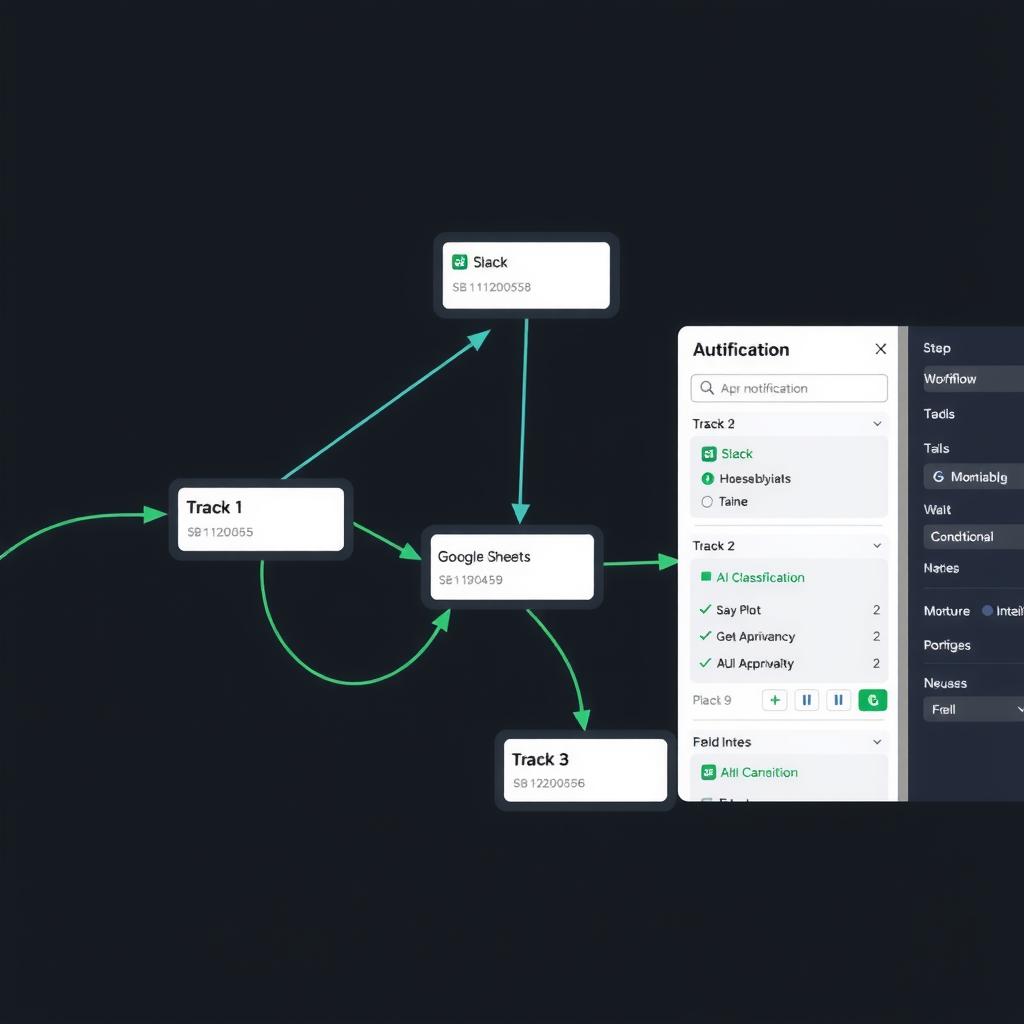
Relay.app Review 2026: The Multi-Track Automation Platform That Runs Workflows in Parallel
Relay.app hands-on review 2026: visual multi-track workflow builder, AI steps, human-in-the-loop approvals, real pricing ($0-$42/mo), pros and cons, and how it compares to Make, Zapier, and n8n for non-developers.
TL;DR
Relay.app is a modern no-code workflow automation platform that does something most competitors can’t: run multiple workflow branches at the same time. Instead of a single straight-line path (step A → B → C), you build workflows with parallel tracks — Slack notification fires while a Google Sheet updates while an AI step drafts an email — all simultaneously [1]. It also ships with AI steps for text generation, classification, and extraction, plus human-in-the-loop approval gates and full version history. Pricing starts free (50 runs/month) and goes up to $42/month (Pro), making it cheaper than Make ($155/mo for Pro) and Zapier ($90/mo for Professional) [2]. The tradeoffs: a smaller app library (200+ integrations vs Zapier’s 7,000+), no self-hosting option, and the AI steps are limited to OpenAI models. Verdict: 7.4/10 — best for non-developers who need multi-branch automation with human oversight; overkill if your workflows are simple linear sequences.
What Is Relay.app?
Relay.app is a visual workflow automation platform launched in 2023 by former Stripe and Google engineers [3]. It competes directly with Make, Zapier, and n8n but takes a different architectural approach: instead of a single linear pipeline, Relay uses a multi-track canvas where branches run in parallel.
The core idea: real-world workflows aren’t linear. When a customer submits a support ticket, you don’t want to (a) log it, then (b) send an email, then (c) create a Slack alert, then (d) add a task. You want all of those to happen at the same time, and you want to be able to pause specific branches for human approval while others proceed automatically [1]. Relay’s canvas lets you build exactly that.
Who it’s for: Operations managers, team leads, and non-developers who manage multi-step approval workflows, cross-departmental automations, or processes where some steps need human review before proceeding. If you’ve hit the limits of Zapier’s linear paths or Make’s scenario structure, Relay is worth a look.
Key Features
Multi-Track Visual Canvas
Relay’s standout feature is its parallel execution canvas. Instead of a single chain of modules, you drag branches onto the canvas that run simultaneously [1]. A typical support automation might have:
- Track 1: Log the ticket in Airtable
- Track 2: Send a Slack alert to the support channel
- Track 3: Run an AI classification step to determine urgency
- Track 4: Check if the customer is VIP and route accordingly
All four tracks fire at once. Tracks can include wait steps (pause until a condition is met), conditional gates (only proceed if AI confidence > 80%), and approval steps (require a human click before continuing) [1]. This is genuinely different from the linear-by-default approach of Make and Zapier.
AI Steps (Built-In)
Relay includes three AI step types powered by OpenAI [4]:
- Generate Text — Write emails, summaries, social posts, or internal notes based on structured inputs
- Classify — Categorize incoming data (urgent vs low-priority, sales vs support, spam vs legitimate)
- Extract — Pull structured fields (names, dates, amounts, email addresses) from unstructured text
AI steps are configured via a simple form — no prompt engineering required — and they integrate with data from any previous step in the workflow. You don’t need an OpenAI API key; model costs are included in your credit usage [4].
Human-in-the-Loop Approvals
Relay bakes approval steps into the canvas. You configure who needs to approve (individual, Slack channel, or email group), what they see (formatted context from previous steps), and what happens on approval vs rejection [1]. Approved paths continue; rejected paths can trigger alternative branches — auto-reply with an explanation, re-route to a senior approver, or log the rejection and stop.
This is notably more polished than Make’s approval workflows (which require webhook workarounds) or Zapier’s (which are limited to the “manual” action type).
Version History
Every change to a workflow creates a saved version. You can name versions (“v2 — added Slack approval gate”), compare side-by-side, and roll back to any previous state in one click [1]. This is a feature most automation platforms charge enterprise rates for — or don’t offer at all. For teams where audit trails matter (compliance, finance, healthcare), this is a meaningful differentiator.
Pre-Built Templates and App Integrations
Relay ships with 200+ pre-built templates covering sales, support, marketing, engineering, HR, and finance [1]. The integration library spans 200+ apps including:
| Category | Apps |
|---|---|
| Communication | Slack, Gmail, Outlook, Microsoft Teams, Discord |
| Spreadsheets | Google Sheets, Excel, Airtable |
| CRM | Salesforce, HubSpot, Close, Pipedrive |
| Project Mgmt | Asana, Trello, Linear, Notion, Jira |
| Storage | Google Drive, Dropbox, OneDrive, Box |
| Other | Calendly, Typeform, Stripe, GitHub, GitLab |
200 integrations is enough for most teams but falls short of Zapier’s 7,000+ or Make’s 2,000+. If you rely on niche SaaS tools, check the integration directory before committing.
Pricing
Relay’s pricing is based on runs (workflow executions) and steps (actions within a workflow) [2]:
| Plan | Price | Runs/Month | Steps/Run | AI Steps | Team Members |
|---|---|---|---|---|---|
| Free | $0 | 50 | 10 | 1 per run | 1 |
| Starter | $22/mo ($20 annual) | 1,000 | 25 | 5 per run | 2 |
| Pro | $42/mo ($35 annual) | 10,000 | 50 | 25 per run | 5 |
| Team | Custom | Custom | Custom | Custom | Unlimited |
[2]
Key pricing details:
- Annual billing saves ~15% on Starter and Pro plans
- Additional runs on Starter/Pro: $0.02 per run over the limit
- AI step costs are included in run pricing — no separate API key or token billing
- No per-user fees beyond the team member caps
- Team plan is custom-priced based on volume and feature requirements
Real-world cost example: A small operations team running 200 workflows per day (6,000/month) with 15 steps each on Pro would run $42/month — well under budget. A team hitting 12,000 runs/month would pay $42 + (2,000 × $0.02) = $82/month [2]. Compare to Make’s Pro plan at $155/month (10,000 operations) or Zapier’s Professional at $90/month (2,000 tasks). Relay is cheaper for medium-volume use but less established as a platform.
Free Tier Sufficiency
The Free tier (50 runs/month) is enough to try the platform thoroughly — build a few real workflows, test the AI steps, and validate the parallel execution model. It’s more generous than Make’s free tier (1,000 ops but per-scenario limits) and less generous than Zapier’s (100 tasks/month with integrations) [2].
Ease of Use
Relay’s learning curve is gentle for anyone who has used Zapier or Make. The canvas is visual and responsive — drag branches, connect them to triggers, configure steps via side panels. The interface is clean and modern, with less visual clutter than Make’s scenario editor.
Setup time: A simple two-branch workflow (log to sheet + send Slack) takes about 5 minutes for a first-time user [3]. An approval workflow with AI classification takes 15-20 minutes.
Where it gets harder: Complex workflows with 10+ branches and conditional logic require careful planning. The visual canvas is excellent, but tracking data flow across parallel branches can get mentally demanding. Relay provides a “data inspector” panel that shows the output of each step — helpful, but not a substitute for documentation. There’s no community template library beyond Relay’s curated list (200+ templates, all official) [1].
Learning resources: Relay provides guided onboarding tutorials, a help center, and email support on paid plans. There is no certification program or community forum at the scale of Make’s or Zapier’s.
Where Relay.app Excels
Approval workflows with parallel branches. This is Relay’s killer use case. A procurement request: log the request to Airtable (Track 1), Slack the finance team (Track 2), run an AI risk classification (Track 3), and wait for a manager’s approval before sending the PO — all coordinated on a single canvas. Zapier and Make can approximate this with workarounds; Relay does it natively.
AI-powered triage. Combined classification + extraction + routing in a single workflow. An incoming support email gets classified as “billing” vs “technical,” extracts the account number and issue description, logs the ticket, and routes to the right team — all in parallel. No API keys, no separate AI tool.
Audit-friendly automation. The version history and approval trails make Relay viable for teams that need compliance documentation. Every workflow change is versioned, every approval is logged, and rollbacks are one-click. This is rare at Relay’s price point.
Budget-conscious teams. At $42/month for 10,000 runs (Pro), Relay undercuts Make ($155/month) and Zapier ($90/month for 2,000 tasks) significantly for medium-volume automation [2].
Where Relay.app Falls Short
Smaller integration library. 200+ integrations covers the major apps but won’t satisfy teams dependent on specialized or industry-specific tools. Zapier’s 7,000+ integrations and Make’s 2,000+ cover far more edge cases. If you use an niche ERP, custom CRM, or industry-specific platform, check compatibility before switching.
No self-hosting or enterprise deployment. Unlike n8n, Activepieces, or Dify, Relay is cloud-only. There is no self-hosted option, no air-gapped deployment, and no SOC 2 report publicly available [1]. For regulated industries or teams with strict data residency requirements, this is a blocker.
AI steps limited to OpenAI models. Relay’s AI steps only support OpenAI (GPT-4 and GPT-3.5). No Anthropic Claude, no Google Gemini, no local model support [4]. If you need multimodal AI, code-writing agents, or model-agnostic workflows, you’ll need to pair Relay with an external AI platform.
No code export. Like Make and Zapier — but unlike n8n — Relay does not let you export workflows as code. Your automations are locked into the platform. If Relay changes pricing, discontinues a feature, or shuts down, migrating off would mean rebuilding from scratch.
Newer platform, smaller community. Relay launched in 2023 and hasn’t reached the community scale of Make (1M+ users) or Zapier (5M+). Fewer tutorials, fewer community templates, fewer experts to hire. The help center and email support are adequate for standard use, but you won’t find Reddit threads or YouTube tutorials for edge cases.
Pricing Breakdown
| Plan | Monthly Price | Annual Price | Best For |
|---|---|---|---|
| Free | $0 | $0 | Trying the platform |
| Starter | $22 | $20 | Solo operators |
| Pro | $42 | $35 | Small teams |
| Team | Custom | Custom | Growing teams |
[2]
At $35/month (annual Pro), Relay is the cheapest serious workflow automation platform with built-in AI capabilities. Lindy AI starts at $49/month for comparable AI features. Make’s Pro plan is $155/month. Zapier’s Professional is $90/month (2,000 tasks) [2].
The equation changes at scale: if you need 50,000+ runs/month, Relay’s Team plan is custom-priced, and Make or n8n (self-hosted, free) may be more cost-effective.
Use Cases
Procurement Approval Workflow
A company sets up a multi-track approval: employee submits a requisition → AI classifies urgency (Track 1) → Slack notification to manager (Track 2) → Google Sheet log (Track 3) → wait for approval → if approved, send PO via email and log to accounting. All branches run in parallel; the human approval step pauses only the final action, not the admin logging.
Support Ticket Triage
Incoming email → AI extracts order number, account name, issue description → AI classifies severity (urgent/routine) → Slack alert to on-call if urgent → Airtable log in all cases → auto-reply with expected response time. The parallel classification means urgent tickets get Slack attention immediately, not after the logging step completes.
Content Approval Pipeline
Writer submits draft → AI checks for style compliance (Track 1) → Slack to editor for review (Track 2) → Google Doc version saved (Track 3) → editor approves → auto-publish to CMS and send status email. If AI check flags issues, approval gate blocks publishing and sends revision request instead.
Alternatives
Make
Make is the closest competitor with a visual canvas, but it uses a linear scenario model. You can approximate parallel execution with routers and multiple scenarios, but it’s less intuitive than Relay’s native multi-track design. Make has 2,000+ integrations, a mature community, and a much larger template library. Better for: teams that need broad integration coverage or are already invested in Make’s ecosystem. [1]
Zapier
Zapier has 7,000+ integrations and the widest app support on the market. The AI features (Zapier AI Actions, ChatGPT integration) are growing, but Zapier’s linear path model and higher per-operation cost make it less suited for complex parallel workflows. Better for: teams that need niche integrations or want the safest bet with the largest community.
n8n
n8n is open-source and self-hostable, with a visual canvas and a code-friendly approach. It supports parallel execution through its “merge” and “split” nodes, and AI integration through HTTP nodes and LangChain tools. n8n has no AI steps out of the box — you bring your own model provider and configure everything. Better for: developers and teams that need self-hosting, code-level control, or unlimited workflows without per-run pricing.
Dify
Dify focuses on AI applications (chatbots, RAG pipelines, multi-agent systems) rather than business process automation. If your primary need is AI app development (not Slack notifications and spreadsheet logging), Dify is a better fit. Better for: AI app builders and teams building LLM-powered products. [6]
Verdict
7.4/10
Relay.app solves a real problem that most automation platforms ignore: workflows aren’t linear, and sometimes humans need to be in the loop. The multi-track canvas, built-in AI steps, and baked-in approval gates make it the best option for team-oriented process automation at a reasonable price.
| Use Case | Verdict |
|---|---|
| Team approval workflows | ✅ Strong recommendation |
| AI-powered triage and routing | ✅ Strong recommendation |
| Simple linear automations | ⚠️ Make or Zapier are more established |
| Enterprise (regulated) | ❌ No self-hosting or SOC 2 |
| High-volume automation (50k+ runs) | ⚠️ Check pricing with Team plan |
| Niche app integrations | ❌ Check integration directory first |
Who should use it: Operations managers, team leads, and non-developers managing multi-step workflows that need parallel execution, AI classification, or human approval gates.
Who should skip: Developers wanting self-hosting, teams dependent on niche integrations, regulated industries needing on-prem deployment, or anyone running simple linear automations that Zapier or Make handle just fine.
FAQ
Does Relay.app have a mobile app?
No. Relay workflows are configured and managed from the web dashboard. Workflows run in the cloud, so they execute whether you’re at your desk or on mobile, but there’s no mobile client for building or monitoring workflows.
Can Relay.app handle API integrations beyond the built-in apps?
Yes. Relay includes a generic HTTP step that can call any REST API with configurable headers, authentication, and payloads. This covers most custom integrations not in the 200+ pre-built app library.
What models power Relay’s AI steps?
Relay uses OpenAI’s GPT-4 and GPT-3.5 model families for Generate Text, Classify, and Extract steps. There is no option to switch to other providers (Claude, Gemini, local models) as of mid-2026 [4].
Is there an API for programmatic workflow triggers?
Yes. Relay provides a webhook trigger that accepts incoming requests from external systems. You can trigger workflows via POST requests, making it possible to connect Relay to any system that can send HTTP calls — including custom apps, IoT devices, and other automation platforms.
How does Relay handle errors and retries?
Relay includes automatic retry for failed steps (configurable interval and max attempts). Failed workflow runs are logged with error details. You can configure fallback branches that execute when a step fails repeatedly, preventing silent failures.
Sources
- Relay.app Platform Features — Official feature documentation for multi-track canvas, approvals, version history, and integrations
- Relay.app Pricing — Official 2026 pricing tiers and plan comparison
- Relay.app About — Company background, founding team, and platform history
- Relay.app AI Steps — AI features documentation: Generate Text, Classify, Extract
- Make Official Pricing — Make.com 2026 pricing for comparison
- Dify Review 2026 — NoCode Insider — Our Dify review for AI app builder comparison
📖 Related Reads
- ToolBrain — tool reviews, LLM comparisons, and AI workflow guides
Cross-links automatically generated from NoCode Insider.
Reviews are independent and based on hands-on testing. Some links may be affiliate links — we earn a commission if you purchase, at no extra cost to you. This never affects our recommendations.