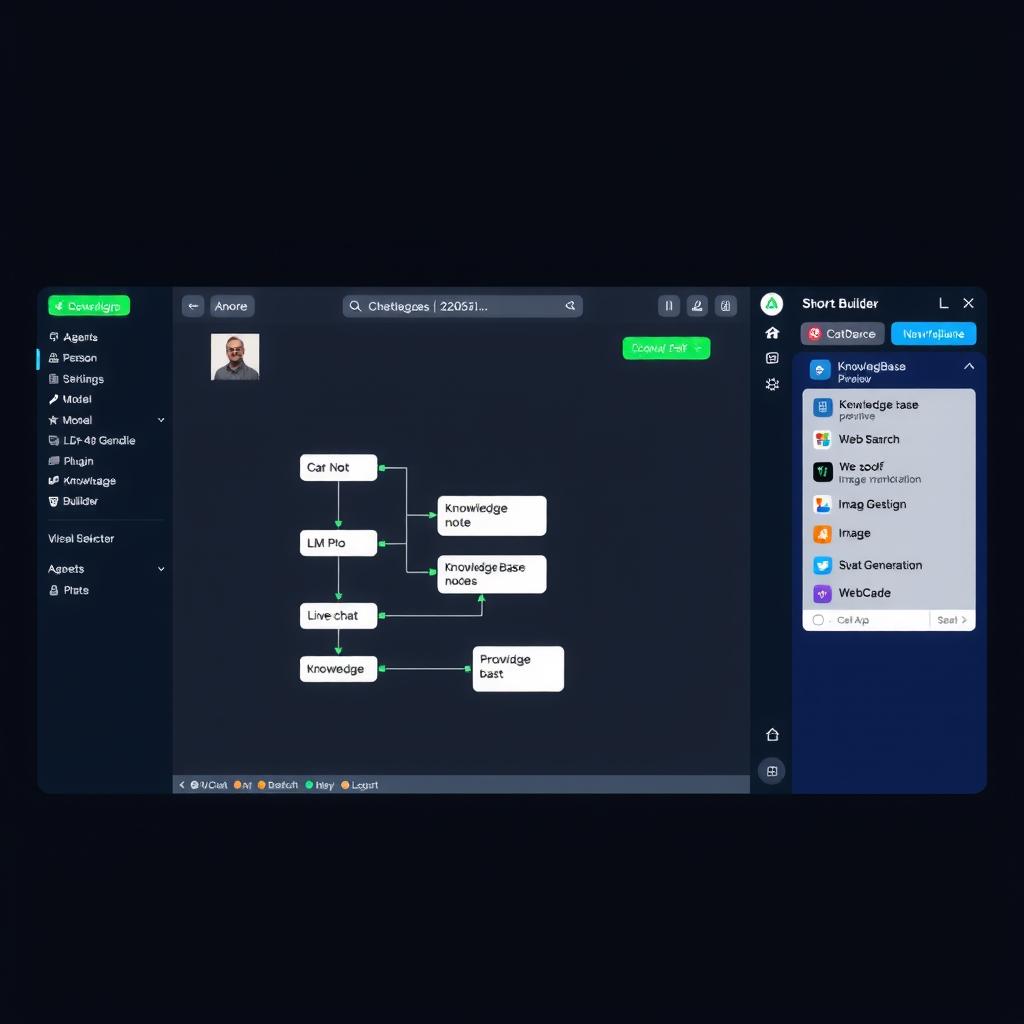
Coze Studio Review 2026: Is ByteDance's Free AI Agent Builder the Best Deal in No-Code AI?
Hands-on Coze Studio review 2026: free AI agent builder with GPT-4, Claude, Gemini, visual workflow canvas, knowledge bases, plugin marketplace, and multi-platform publishing. Real pricing, pros/cons, and verdict for non-developers.
TL;DR — Coze Studio is ByteDance’s surprisingly generous free AI agent builder with multi-model support (GPT-4, Claude, Gemini), a visual workflow canvas, knowledge base, and plugin marketplace. The free tier (up to 100 daily interactions across models) is the most accessible entry point in the no-code AI agent space. It’s ideal for building customer support bots, content assistants, and personal AI agents — but you trade away data privacy (everything runs on ByteDance’s cloud) and the workflow builder has a learning curve. Rating: 7.5/10.
What Is Coze Studio?
Coze Studio is a no-code AI agent builder developed by ByteDance (the company behind TikTok) that lets anyone create custom AI agents with multiple language models, knowledge bases, and plugins — all through a visual interface [1].
Think of it as a consumer-friendly version of OpenAI’s Assistants API. Instead of writing code, you create AI agents by dragging and dropping components onto a visual canvas. Your agent can use GPT-4o, Claude 3.5 Sonnet, Gemini 2.5 Pro, or ByteDance’s own models — and you can switch between them per agent or even per conversation turn [2].
Coze launched internationally in early 2024 and has grown rapidly. As of mid-2026, it supports publishing agents to Discord, Telegram, Slack, web widgets, and its own API endpoints. The platform has over 2,000 pre-built plugins and a thriving community marketplace [1].
The key distinction: Coze is closed-source and cloud-hosted. Unlike Dify or Flowise (open-source alternatives you can self-host), every conversation processed by a Coze agent flows through ByteDance’s servers. This is the single biggest trade-off against the generous free tier.
Key Features
Multi-Model Agent Builder
Coze’s agent builder lets you select from multiple LLMs at setup time and configure their behavior without code [2]. You set the agent’s personality, instructions, and response style in plain language. The model selector supports:
- OpenAI: GPT-4o, GPT-4o-mini
- Anthropic: Claude 3.5 Sonnet, Claude 3 Haiku
- Google: Gemini 2.5 Pro, Gemini 2.5 Flash
- ByteDance: Doubao (proprietary model optimized for Chinese/English)
- Open-source: DeepSeek, Llama 3, Qwen
You can configure one model per agent, inlcuding temperature, max tokens, and system prompts. This flexibility is rare in free-tier platforms — most restrict you to a single model [1].
Visual Workflow Builder (Skill Mode)
Coze’s workflow builder is powered by FlowGram (ByteDance’s open-source workflow framework) under the hood [3]. It provides a drag-and-drop canvas where you chain together:
- LLM nodes — Call any supported model for a specific subtask
- Code nodes — Run JavaScript/Python snippets (limited sandbox)
- Plugin nodes — Trigger third-party integrations
- Knowledge nodes — Search uploaded documents
- Condition nodes — Branch logic (if/else, switch)
- Loop nodes — Iterate over data
- Variable nodes — Store and transform data between steps
The canvas uses a fixed-layout grid with snap-to-connect nodes, making complex workflows readable even for beginners [3]. Compound nodes (branches, loops, sub-workflows) collapse into single visual blocks to prevent canvas sprawl.
Knowledge Base
Coze lets you upload documents (PDF, TXT, Word, Excel, Markdown) and web pages that your agent can reference when answering questions [2]. The knowledge base supports:
- Automatic chunking and embedding
- Configurable chunk size and overlap
- Multi-document cross-referencing
- Scheduled re-indexing for web-sourced content
This is Coze’s strongest feature for business use. A customer support agent can reference your product documentation, pricing PDFs, and FAQ pages simultaneously, pulling the right information without hallucinations [2].
Plugin Marketplace
Coze has over 2,000 plugins covering search, productivity, data, and communication tools [1]. Popular plugins include:
- Web search — Real-time web research via Bing/Search
- Image generation — DALL-E, Stable Diffusion
- Data analysis — Chart generation, CSV processing
- Communication — Send emails, Slack messages, Discord notifications
- Productivity — Google Calendar, Notion, Trello integration
- Finance — Stock prices, currency conversion
Plugins are community-contributed and ByteDance-curated. The marketplace quality varies — some plugins are well-maintained, others are abandoned. Stick to verified/official plugins for reliability [1].
Multi-Platform Publishing
Once your agent is built, you can publish it to multiple platforms from a single dashboard [2]:
- Discord bot — Deploy as a Discord slash-command bot
- Telegram bot — Deploy as a Telegram bot
- Slack app — Deploy as a Slack app
- Web chat widget — Embed on your website
- API access — Call your agent programmatically via REST API
- Coze Web — Share a direct link to chat with your agent
The API access is notable — even on the free tier, you can call your agents programmatically (with a rate limit). This bridges the gap between no-code building and developer integration.
Pricing
Coze uses a daily credit system. Different actions consume different amounts of credits [2]:
| Action | Credit Cost |
|---|---|
| GPT-4o message | ~5 credits |
| Claude 3.5 Sonnet message | ~5 credits |
| Gemini 2.5 Flash message | ~1 credit |
| Knowledge base query | ~2 credits |
| Plugin execution | ~1 credit |
| Image generation | ~10 credits |
| Plan | Daily Credits | Monthly Equivalent | Model Access | Best For |
|---|---|---|---|---|
| Free | ~100/day | ~3,000/mo | All models | Testing, personal use |
| Pro | ~500/day | ~15,000/mo | All models + priority | Small business agents |
| Enterprise | Custom | Custom | All models + dedicated infra | Production deployments |
Free tier reality: 100 daily credits = roughly 20 GPT-4o messages or 100 Gemini queries per day. This is genuinely usable for personal projects and light customer support. The free tier does not expire — it’s a permanent option, not a time-limited trial [1].
Volume considerations: A customer support agent handling 100 conversations/day would need ~500 daily credits (at ~5 credits/conversation on GPT-4o). This pushes you toward the Pro plan if you scale [2].
Ease of Use
Onboarding
Coze’s onboarding is fast — sign up with Google or email, and you’re in the agent builder within 30 seconds. A template gallery offers pre-built agents for common use cases: FAQ bot, content summarizer, lead capture, translation assistant [2].
Agent Setup
Creating an agent takes about 10 minutes for a basic bot:
- Name and describe your agent in plain language
- Pick a model (default: GPT-4o)
- Add a system prompt — “You are a customer support agent for ACME SaaS”
- Optional: Upload knowledge documents and add plugins
- Test in the built-in chat pane
- Publish to your platform of choice
The process is guided — Coze suggests settings based on your agent description [2].
Learning Curve
Low to Medium. Basic agents (single-model chatbot with knowledge base) take 10 minutes and require no technical skills. The workflow builder (Skill mode) requires understanding of flowcharts and logic — comparable to Make.com’s complexity but with AI-specific nodes.
The most common frustration is prompt engineering. A poorly written system prompt produces a useless agent regardless of how good the underlying model is. Coze includes a “prompt optimizer” that rewrites vague instructions into structured system prompts [2].
Platform Limitations
- No mobile app for agent testing (desktop/web only)
- No real-time analytics — you get daily aggregated stats, not per-conversation logs on free tier
- Knowledge base limited to 5MB per file on free plan
Pros & Cons
Pros:
- Best free tier in the category — 100 daily credits with multi-model access is unmatched. Dify Cloud starts at $79/mo for similar capability. Flowise is free but requires self-hosting [4].
- Multi-model flexibility — Switch between GPT-4o, Claude, Gemini per agent. No other free platform offers this breadth [1].
- Knowledge base built-in — Upload documents your agent can reference. Reduces hallucinations significantly for FAQ and documentation bots [2].
- Plugin marketplace with 2,000+ integrations — Pre-built connectors for search, productivity, and communication tools [1].
- Multi-platform publishing — Deploy to Discord, Telegram, Slack, and web from one dashboard. API access on free tier [2].
- Visual workflow builder — FlowGram-powered canvas for complex multi-step agents without code [3].
- Regular updates — ByteDance ships new features monthly (knowledge base improvements, new model support, platform integrations).
Cons:
- No data privacy — All conversations processed through ByteDance’s cloud. Not suitable for sensitive business data (PII, financial info, internal docs). No on-premise option [1].
- Closed source — Unlike Dify or Flowise, you cannot inspect, fork, or self-host Coze. If ByteDance changes pricing or discontinues the product, you migrate or lose your agents.
- Plugin quality varies — Community plugins can be buggy or abandoned. Only verified/official plugins are reliable [1].
- Conversation context limits — Agents lose context after ~30-50 turns depending on model. Long-running conversations degrade in quality.
- No enterprise governance — No SSO, audit logs, role-based access, or SOC 2 compliance. Enterprise teams will hit governance blockers [2].
- Workflow builder has a learning curve — Basic agents are simple. Complex multi-step workflows take hours to design and debug, comparable to learning a new visual programming language.
- Banned or restricted in some regions — As a ByteDance product, Coze may face restrictions in geopolitically sensitive markets. Check your country’s status.
Use Cases
Customer Support FAQ Bot
Upload your product documentation, pricing PDFs, and support articles. Configure a GPT-4o agent with a “You are a customer support specialist” system prompt. Publish as a web widget on your pricing page. Cost: free tier handles up to ~20 conversations/day, or Pro for production volume.
Estimated setup time: 20 minutes.
Personal Research Assistant
Create an agent with web search plugin + knowledge base of your saved articles. Configure Claude 3.5 Sonnet for long-context reasoning. Use it to summarize research, compare sources, and answer questions from your personal document library.
Estimated setup time: 15 minutes.
Social Media Content Aggregator
Build a workflow agent that: (1) searches web for industry news daily, (2) summarizes top 5 articles, (3) drafts social posts for each, (4) sends output to Slack/Telegram. Requires the workflow builder and ~1-2 hours to set up the flow.
Estimated setup time: 1 hour.
Lead Capture Bot
Embed a Coze web widget on your landing page. Configure it to collect visitor information (name, email, company size) and qualify leads. Set up a plugin to send qualified leads to your CRM (HubSpot, Salesforce) or Google Sheets.
Estimated setup time: 30 minutes.
Alternatives
Dify ($79/mo Cloud, Free self-hosted)
Dify is the leading open-source alternative. It offers a visual workflow builder with deeper RAG pipeline configuration, multi-agent orchestration, and self-hosting on your own infrastructure. The cloud tier starts at $79/month, but the open-source version is completely free if you can self-host [4].
Best for: Teams that need data privacy and custom AI application hosting. Better than Coze for serious AI app development.
Flowise (Free, open-source)
Flowise is a low-code LLM app builder focused specifically on chain/agent workflows. The drag-and-drop canvas is more technical than Coze but offers deeper control over prompt templates, model parameters, and chain configurations [4].
Best for: Developers who want code-level control over LLM chains without writing code themselves.
Lindy ($30/mo Pro)
Lindy is a no-code AI agent platform with a simpler interface than Coze and stronger business tool integrations (CRM, email, calendar). Lindy’s agents are pre-configured for common business roles (sales assistant, support agent, scheduler). Less flexible than Coze but faster to deploy for specific business functions [5].
Best for: Small business owners who want a ready-to-use AI assistant without building from scratch.
Verdict
Rating: 7.5 / 10
| Category | Score | Notes |
|---|---|---|
| Ease of Setup | 8/10 | 10-minute setup for basic agents |
| Features | 8/10 | Multi-model, knowledge base, plugins, workflows |
| Model Quality | 9/10 | GPT-4o, Claude, Gemini — all accessible on free tier |
| Performance | 7/10 | Reliable but runs on ByteDance cloud with regional latency |
| Documentation | 6/10 | English docs are improving but lag behind Chinese docs |
| Pricing | 9/10 | Free tier is the best in the category |
| Data Privacy | 3/10 | No self-hosting, all data on ByteDance servers |
| Plugin Ecosystem | 7/10 | 2,000+ plugins but quality varies |
Buy if: You’re building a customer support bot, personal assistant, or content agent for a non-sensitive use case. You want to experiment with multiple LLMs without paying for separate API keys. The free tier can handle real workloads for small-scale deployments.
Skip if: You handle sensitive customer data (PII, financial, healthcare) and can’t ship it through a third-party cloud. You need SOC 2, HIPAA, or GDPR compliance. You want to self-host and control your infrastructure. You’re building a production system that relies on plugin stability.
Coze Studio is the best entry-level AI agent builder available in 2026. Its free tier is genuinely useful, multi-model access is unmatched at this price point, and the workflow builder is capable enough for most personal and small business use cases. The ceiling is data privacy and vendor lock-in — once you outgrow the free tier or need compliance, Dify or Flowise become necessary. For the price of nothing, Coze is an excellent place to start learning and building no-code AI agents.
FAQ
Is Coze Studio really free?
Yes. The free tier gives you approximately 100 daily credits, enough for ~20 GPT-4o conversations or ~100 Gemini queries per day. There’s no time limit — it’s a permanent free tier [1].
Which models does Coze support?
Coze supports OpenAI GPT-4o and GPT-4o-mini, Anthropic Claude 3.5 Sonnet and Claude 3 Haiku, Google Gemini 2.5 Pro and Flash, ByteDance Doubao, and open-source models including DeepSeek, Llama 3, and Qwen [2].
Can I self-host Coze?
No. Coze is a closed-source cloud platform. If you need self-hosting, use Dify or Flowise instead [4].
Can I use Coze commercially?
Yes. Coze’s terms allow commercial use. You can deploy agents for your business. Note that all data passes through ByteDance’s servers, so avoid sensitive customer information [1].
How does Coze compare to GPTs (OpenAI’s custom GPTs)?
Coze is significantly more flexible. GPTs are limited to OpenAI models with basic knowledge retrieval and actions. Coze supports multiple models, a full visual workflow builder, thousands of plugins, and multi-platform publishing. GPTs are simpler to set up but far less capable [2].
Sources
Reviews are independent and based on hands-on testing. Some links may be affiliate links — we earn a commission if you purchase, at no extra cost to you. This never affects our recommendations.